A.I. Scoring API
The ZeroBounce A.I. Scoring API combines a vast selection of data with proven statistical analysis to granularity rate the quality level of an email address. The software identifies positive and negative patterns of an email address and returns a score that users can rely on when performing their email hygiene. The methodology of ZeroBounce A.I. periodically adjusts as email trends evolve.
Get an in-depth look into the quality of your leads by learning more about your subscribers’ online activity. With the added information you can segment your lists to better serve your customers with targeted messaging. If you want to further segment your email list based on Quality Score, we recommend validating your "valid" file also.
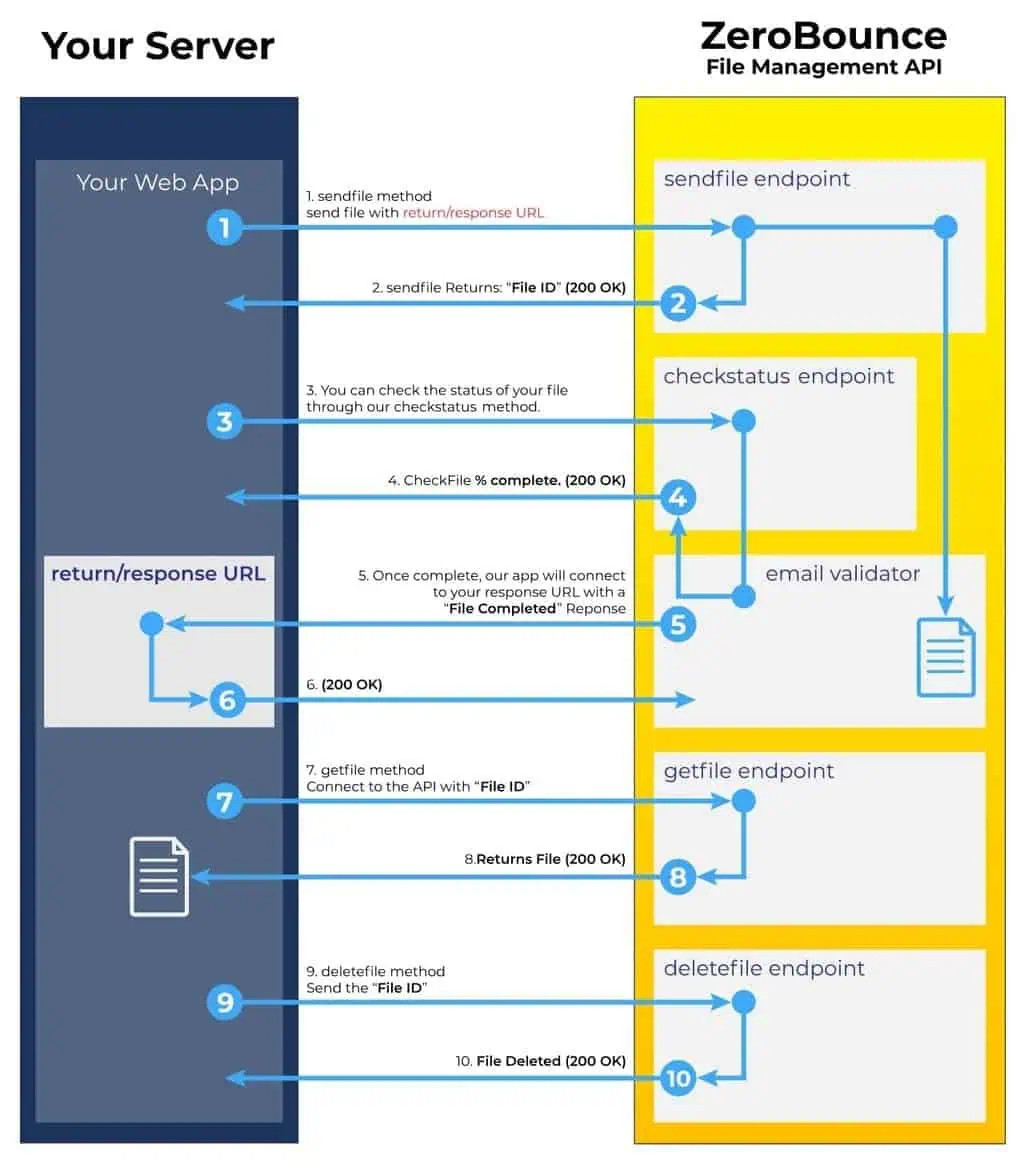
Recommended File management endpoint for AI Scoring

Recommended File management endpoint usage
Send File
Ready to use our bulk email scoringⓘ API?
The scoring sendfile API allows you to send a file for bulk email scoringⓘ. The content type needs to be multipart/form-data. Please refer to the C# example for details.
POST /V2/SCORING/SENDFILE
API URL: https://bulkapi.zerobounce.net/v2/scoring/sendfile
Below you will see a list of the required parameters. Please gather this data in the right format before you proceed.
- Your file needs to have a .csv or .txt format.
- Next, you’ll need your unique API key which you can find in your ZeroBounce account.
URL Parameters
- ParameterRequired / OptionalDescription
- fileRequiredThe csv or txt file. Byte array contents for the submitted file. The content's header is type of "text/csv"
- api_keyRequiredYour API Key, found in your account
- email_address_columnRequiredThe column index of the email address in the file. Index starts at 1
- return_urlRequiredThe URL will be used as a callback when the scoring service is completed
- has_header_rowRequiredIf the first row from the submitted file is a header row. True or False
- remove_duplicateOptionalIf you want the system to remove duplicate emails (true or false, default is true). Please note that if we remove more than 50% of the lines because of duplicates (parameter is true), system will return a 400 bad request error as a safety net to let you know that more than 50% of the file has been modified.
If a return_url was specified in the Multipart Form Data during the send file request, we will POST the following data to the URL when the validation process is complete.
{
"file_id": "aaaaaaaa-zzzz-xxxx-yyyy-5003727fffff",
"file_name": "Your file name.csv",
"upload_date": "2023-04-28T15:25:41Z"
}
SEND FILE CODE SAMPLES
Send File
ENDPOINT RESPONSE
Here we provide you with examples of both successful and error responses for the bulk email scoringⓘ API.
Successful Response
{
"success": true,
"message": "File Accepted",
"file_name": "Your file name.csv",
"file_id": "aaaaaaaa-zzzz-xxxx-yyyy-5003727fffff"
}Error Response
{
"success": false,
"message": [
"Error messages"
]
}Do you have any questions or need help getting started with the ZeroBounce bulk email scoringⓘ API? Please get in touch with our team. Our Customer Support specialists are available 24/7 to guide you and help clarify potential issues.
The email scoringⓘ API can be used both in bulk and in real time.
File Status
Would you like to see the status of a file you submitted via the ZeroBounce email scoringⓘ API? You can check it at any time and see details about your credit usage and processed data.
The scoring filestatus API returns the file processing status for the file you submitted using sendfile API. Please refer to the C# example for details.
GET /V2/SCORING/FILESTATUS
API URL: https://bulkapi.zerobounce.net/v2/scoring/filestatus
URL Parameters
- ParameterRequired / OptionalDescription
- api_keyRequiredYour API Key, found in your account
- file_idRequiredThe returned file ID when calling scoring sendfile API
If you want to call the API from your browser to test it, all you have to do is replace the API KEY with your unique API key and the FILE ID with the returned file ID from scoring sendfile.
FILE STATUS CODE SAMPLES
File Status
ENDPOINT RESPONSE
Below we provide examples of both successful and unsuccessful responses for using the filestatus API.
This is an example of a successful response:
{
"success": true,
"file_id": "aaaaaaaa-zzzz-xxxx-yyyy-5003727fffff",
"file_name": "Your file name.csv",
"upload_date": "2023-04-28T15:25:41Z",
"file_status": "Complete",
"complete_percentage": "100%",
"return_url": "Your return URL if provided when calling sendfile API"
}
This is an example of an error response:
{
"success": false,
"message": "Error messages"
}
Using the email scoringⓘ API to further validate catch-all emailsⓘ allows you to automate this process and save time. ZeroBounce will use one credit for every email address the scoring system processes.
Need more help regarding your email scoringⓘ API file status? Please reach out to our customer support team – we’re always available to answer and questions and guide you.
A.I. Scoring API: Get File
Have you used our email scoring API and would like to get your results?
The scoring getfile API allows you to get your email scoring results for the file you submitted using scoring sendfile API. Please refer to the C# example for details.
GET /V2/SCORING/GETFILE
API URL: https://bulkapi.zerobounce.net/v2/scoring/getfile
URL Parameters
- ParameterRequired / OptionalDescription
- api_keyRequiredYour API Key, found in your account
- file_idRequiredThe returned file ID when calling scoring sendfile API
GET FILE CODE SAMPLES
Get File Status
ENDPOINT RESPONSE
Below we provide examples of both successful and unsuccessful responses for using the getfile API.
This is an example of a successful response:
//N/A
The scoring getfile API returns the scoring results file. The returned content type is "application/octet-stream". You can get the file name from response.Content.Headers.ContentDisposition.FileName. If you are calling the API directly from the browser, you can either save or open the results file from the browser.
This is an example of an error response:
{
"success": false,
"message": "Error messages"
}The ZeroBounce Score system is one of the most efficient tools to determine the validity of catch-all email addresses. Most of our customers will get a certain number of “catch-all” statuses in their email validation results. These types of emails are impossible to validate the classic way. That’s why we developed ZeroBounce Score: to offer you an extra tool that provides further insights into the validity of your catch-all emails.
ZeroBounce Score allows you to determine which of the catch-all emailsⓘ in your list are valid, so you can keep them while removing the rest.
If you have any questions about getting your ZeroBounce Score results, please drop us a line. Our Customer Support team is available 24/7 to guide you and answer all your questions.
A.I. Scoring API: Delete File
Are you trying to delete a file that you submitted via the ZeroBounce email scoringⓘ API? Once you’ve gathered your results, you can delete your file at any time.
The scoring deletefile API deletes the file that was submitted using scoring sendfile API. Before you begin, please note that the file can be deleted only when its status is Complete.
GET /V2/SCORING/DELETEFILE
API URL: https://bulkapi.zerobounce.net/v2/scoring/deletefile
To delete your email scoring API file, you will need:
- your API key which you’ll be able to find in your account
- the file ID you used when calling scoring sendfile API
URL Parameters
- ParameterRequired / OptionalDescription
- api_keyRequiredYour API Key, found in your account
- file_idRequiredThe returned file ID when calling scoring sendfile API
DELETE FILE CODE SAMPLES
Delete File Response
A.I. Scoring API: Delete File
ENDPOINT RESPONSE
Below we provide examples of both successful and unsuccessful responses for using the deletefile API.
This is an example of a successful response:
{
"success": true,
"message": "File Deleted",
"file_name": "test2",
"file_id": "b222a0fd-90d5-416c-8f1a-9cc3851fc823"
}
This is an example of an error response:
{
"success": false,
"message": "File cannot be found."
}
The ZeroBounce email scoringⓘ API allows you to investigate catch-all emailsⓘ in real time, at the point of entry. The API automates the scoring process, saves you time and adds the data to your email database almost instantly.
If you need help deleting your email scoringⓘ file, please reach out to our customer support team. We are available 24/7, 365 days a year, to answer any questions and guide you through the process.
SINGLE EMAIL SCORING - REAL-TIME (V2)
This feature enables customers to get a score for a single email address in real time.
- GET /V2/SCORING
API DEFAULT URL: https://api.zerobounce.net/v2/scoring
API U.S.A URL*: https://api-us.zerobounce.net/v2/scoring
API EU URL: https://api-eu.zerobounce.net/v2/scoring
Below is the list of the required parameters. Please format your data in this format before you proceed.
URL Parameters
- ParameterRequired/OptionalDescription
- api_keyRequiredYour API Key, found in your account
- emailRequiredThe email address that you want to retrieve Scoring data for
Below are examples of both successful and unsuccessful responses for using the scoring API.
This is an example of a successful response:
{
"email": "mark@gmail.com",
"score": 10
}
These are examples of unsuccessful responses:
{
"error": "Missing parameter: api_key",
}
{
"error": "Missing parameter: email",
}
{
"error": "Invalid API key or your account ran out of credits",
}
Error message for an invalid email syntax:
{
"error": "Please provide a valid email address",
}Need more help with the Email Scoringⓘ API? Please reach out to our customer support team – we’re always available 24/7 to answer any questions and guide you.